Wireless Optical Mouse for Laptop and Desktop Use
| 1-100 | 101-1000 | 10001-100000 |
|---|---|---|
| $2.50/ unit | $2.05/ unit | $1.75/ unit |
Wireless Optical Mouse for Laptop and Desktop – Ergonomic Design, USB-C Charging, Multiple Buttons
Wireless Optical Mouse for Laptop and Desktop
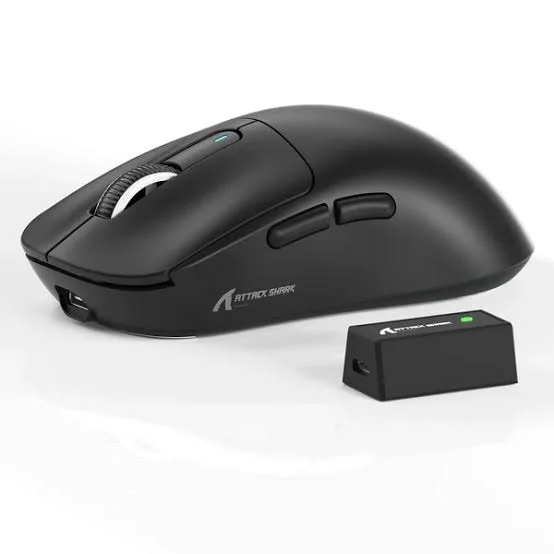
This wireless optical mouse connects to laptops and desktops via a USB nano receiver and charges through a USB-C port, removing the need for disposable batteries. The optical sensor tracks movement accurately across standard surfaces including cloth, wood, and most desk mats. Available in solid black, solid white, black with patterns, and white with patterns, the mouse is built from plastic with an ergonomic shape that includes a palm arch and a textured scroll wheel for consistent grip during extended sessions.
Connectivity and Receiver
The mouse uses a wireless connection through a compact USB dongle that plugs into any available USB port on your laptop or desktop. The nano-style receiver sits low in the port, reducing the chance of accidental damage when moving between workspaces. No software installation is required to establish a basic connection — plug in the receiver and the mouse is ready to use.
Optical Sensor and Scroll Wheel
The optical sensor reads surface movement and translates it into cursor motion on screen. This type of sensor performs reliably on most non-glossy surfaces. The scroll wheel has a textured surface that provides friction during scrolling, which helps with control when moving through long documents or web pages. The wheel also functions as a clickable middle button.
Button Layout
The mouse includes multiple buttons beyond the standard left and right clicks:
- Left and right click buttons
- Clickable scroll wheel
- Additional programmable buttons for shortcut assignment
The programmable buttons can be configured for tasks such as navigating browser history, switching between applications, or other frequently used actions depending on your workflow.
Ergonomic Shape and Build
The mouse body follows an ergonomic contour with a raised palm arch that supports the natural curve of the hand during use. This shape is suited to right-handed users who work at a desk for extended periods. The outer shell is plastic, keeping the overall weight low. The patterned color options feature printed designs on the same plastic body — the pattern is part of the surface finish rather than a separate material layer.
USB-C Charging
Rather than running on AA or AAA batteries, this mouse has an internal rechargeable battery that charges via USB-C. This means you can use the same cable you may already carry for a phone or laptop. The mouse can typically be used while charging, though wireless range may be limited during that time depending on cable length.
Compatible Surfaces and Use Cases
The optical sensor works on most standard desk surfaces and mouse pads. Performance may be reduced on highly reflective, glossy, or transparent surfaces such as glass desktops. The mouse is suited for general office tasks, document editing, web browsing, and light productivity work on both Windows and macOS systems.
Color and Style Options
- Solid black
- Solid white
- Black with surface pattern
- White with surface pattern
All color variants share the same ergonomic form and feature set. The choice of color or pattern does not affect performance or button configuration.
Product Specifications
| Specification | Detail |
|---|---|
| Connectivity | Wireless |
| Sensor Type | Optical |
| Buttons | Multiple programmable buttons |
| Design | Ergonomic with palm arch support |
| Receiver | USB dongle |
| Scroll Wheel | Textured for grip |
| Charging Port | USB-C |
Search Tags
Packaging
Delivery
This Seller Other Products



Similar Products